What’s New In Swift4
This article is to highlight the key features added/ modified in Swift 4. Apple scheduled to release Swift 4 in fall 2017 and its beta versions are already available for download for developers.
Downloading Swift 4 Snapshot
Swift 4.0 Snapshots are prebuilt binaries that are automatically created from swift-4.0-branch branch. Latest snapshot package downloaded from Swift 4.0 Development section from here.
Run downloaded installer file to install the snapshot. Now goto Xcode->Toolchains and select the snapshot as in below screenshot.
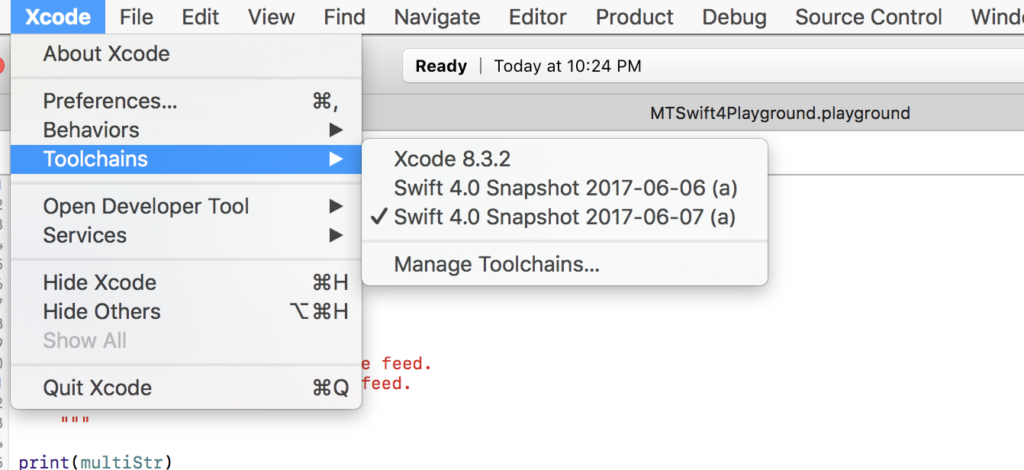
There is nothing more to do; you are all set to play with Swift 4. Create new playground file and test it out yourself all the new Swift 4 features.
Here, I covered the important new/modified features and I will keep adding here as I get more details
Strings
String is a collection
Strings are now collections in Swift 4 like it was in Swift 2. This allows iterating though characters in string. Just like any other collection, string can reversed, apply map() and flatmap() !
let swift4String = "String is collection of characters in Swift4"
for char in swift4String.reversed() {
    print(char) // prints each character in reversed string
}
Multi-line string literals
Swift 3 requires line break (\n) to write multi-line strings. In Swift 4 introduces triple quotes (“””) to start and end of the multiline string. It lets use quote marks without escaping.
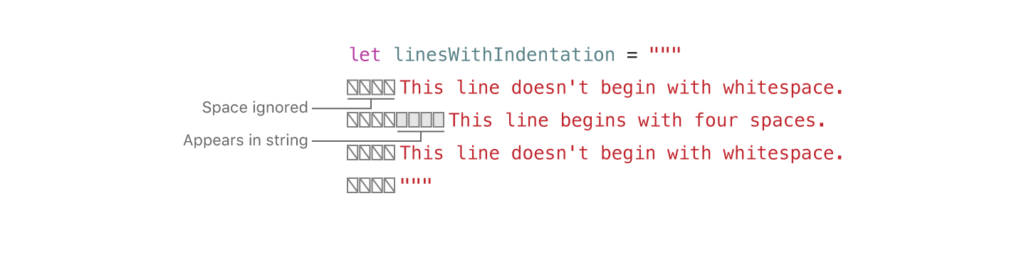
The indentation of the closing delimiter determines how much whitespace is stripped from the start of each line.
var multiStr =
"""
This string starts with a line feed.
It also ends with a line feed.
"""

print(multiStr)
This image demonstrates on how indentation works
Substring is new type
Swift 4 introduced Substring type to represent the String slices.
var str = "Hello, playground"
let commaIndex = str.index(of: ",")!
let substring = str.substring(to: commaIndex)  // Hello
print(type(of: substring))    //String

let substringRange = str[..<commaIndex]
print(type(of: substringRange))  //Substring
The need for introducing Substring is to optimize memory for Strings. I will create a separate article on memory management and talk about Substring there.
Unicode 9 Characters
Each String emoticon is now 1 character in Swift 4.
"👩👩👧".count //is 1 in Swift 4 "👩👩👧".characters.count //is 3 in swift 3

Passionate about learning new things. Loves coding and problem solving. Built apps from scratch on iOS platform with Swift, Objective – C, HTML 5, javascript, Cordova, Xamarin using both MVC and MVVM. Coded extensively in .Net and Database technologies before moving to mobile development.
Spends free time playing with my kid and watching TV.
https://shorturl.fm/hee1M
https://shorturl.fm/D5sgH
https://shorturl.fm/lUVfI
https://shorturl.fm/aKCWW
https://shorturl.fm/mqLBZ
https://shorturl.fm/8EvMe
https://shorturl.fm/JnWAG
https://shorturl.fm/LrYTl
https://shorturl.fm/jPkyJ
https://shorturl.fm/JF012
https://shorturl.fm/d2KZj
https://shorturl.fm/TluNV
https://shorturl.fm/gRjDk
https://shorturl.fm/4aqQN
https://shorturl.fm/5G1hq
https://shorturl.fm/eBKZs
https://shorturl.fm/xsu7C
https://shorturl.fm/pHztq
https://shorturl.fm/qLp5c
https://shorturl.fm/1Kskg