Drag and Drop in UICollectionView in iOS 11
What’s New:
iOS 11 introduced the drag and drop feature that lets you drag , drop the content from one application to other application on iPad. This article provides the high level overview with example code on this to drag and drop the UICollectionViewCells in UICollectionView.
Click this see the drag and drop video in action for the code in the article.
Delegates:
- dragDelegate – This delegate manages the dragging of items from collection view.
- dropDelegate – This delegate manages the dropping of items to collection view
Protocols:
- UICollectionViewDragDelegate – This protocol requires the implementation of below method that provides the item to be dragged
public func collectionView(_ collectionView: UICollectionView, itemsForBeginning session: UIDragSession, at indexPath: IndexPath) -> [UIDragItem]
- UICollectionViewDropDelegate – This protocol requires implementation of below method that holds the items being dropped to CollectionView.
func collectionView(_ collectionView: UICollectionView, performDropWith coordinator: UICollectionViewDropCoordinator)
Example:
Let’s explore the drag and drop feature by creating a collection view that holds images. Drag and drop allows the images from other applications (like photos..etc) to be added to our collectionView by dragging and vice-versa in other direction for dropping
Steps:
- Implement the CollectionView with each cell holding some image.
- Set the drag and drop delegates to the object that provides the implementation of UICollectionViewDragDelegate, UICollectionViewDropDelegate. In this example, we are setting the delegates to self.
collectionView.dragDelegate = self
collectionView.dropDelegate = self
- Implement the both the new delegates. Code provided below with explanation following it.
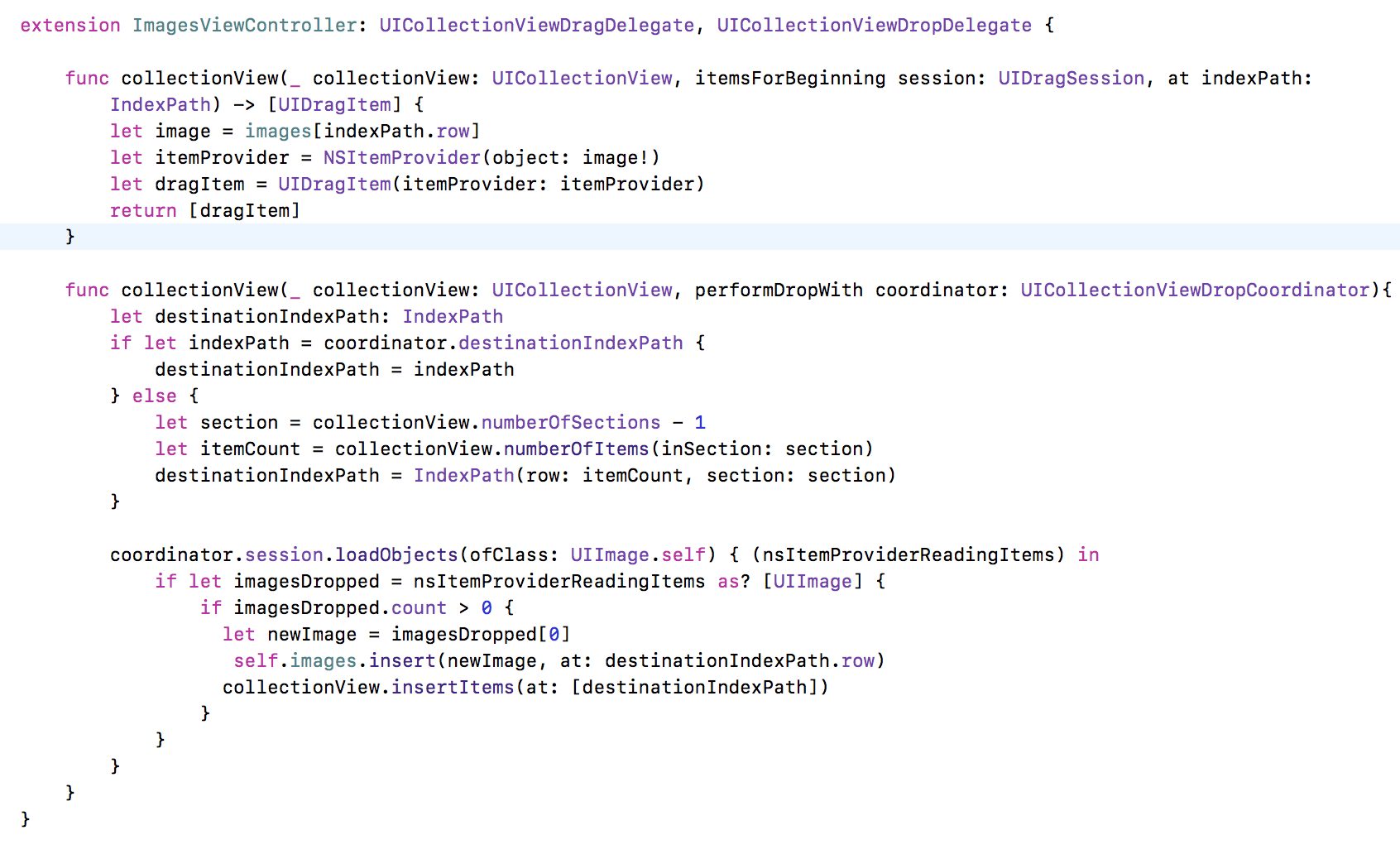
Explanation:
Drag:
collectionview(_:itemsForBeginning:at:) This method expects the UIDragItem to identify the content that needs to be carried while dragging the cell.

This above method is enough to allow the image to be dragged from UICollectionViewCell to any other application to which image can be dropped
Drop:
collectionView(_:performDropWith:) This method has the implementation of capturing the image dropped by other application and creating the new UICollectionViewCell and add the image to it.

This article provides the basic introduction to drag and drop feature. Complete code can be obtained from GitHub link Let me know in comments for any queries. Happy coding!!

Passionate about learning new things. Loves coding and problem solving. Built apps from scratch on iOS platform with Swift, Objective – C, HTML 5, javascript, Cordova, Xamarin using both MVC and MVVM. Coded extensively in .Net and Database technologies before moving to mobile development.
Spends free time playing with my kid and watching TV.